 André Spineli
Why DevStation?
Every once in a while, a disk in a machine that had been running for years would stop working, the OS wouldn’t boot, and there I was again: reinstalling, restoring backups, trying to remember exactly how the thing had been wired together the last time. The homelab was never a critical environment, the problem is that rebuilding it is complex, and that work repeated itself in full on every failure. DevStation started as an answer to that rework. This is the story of how it got there.
A homelab for more than fifteen years
I’ve run homelabs for more than fifteen years. Early on, the router was the firmware: an AMD Geode with 512 MB of RAM running BrazilFW as its operating system, bonding a 10 Mb ADSL link and a 2 Mb cable link (the latter with a static IP from a local ISP) into something stable enough to host online RPG game servers for friends. Next to it, a Pentium 4 with 2 GB ran an appserver, PHP and Apache, for the game and its site.
Over the years the boxes got more serious: proper Linux servers, more services, and eventually everything living on Proxmox. But one thing never changed: it was consumer hardware running 24×7, doing work it was never rated for.
The same failure, over and over
So the disks died. Nothing dramatic, it was just the normal wear of hardware running nonstop, and every time the same work repeated itself.
I did what is usually recommended: automated database dumps, scheduled backups, uploads to the cloud. Later came RAID 1 and SSDs to gain some resilience. None of it removed the real cost: the data survived, but the machine did not. The exact arrangement of VMs, packages, configs, and the dozen small decisions that made everything talk to each other was lost with it. Restoring a backup was easy, but rebuilding the environment around it was not.
Over time the environment also drifted out of my head: after a few months of stability, I no longer remembered exactly how the cluster was configured.
Trying to make it reproducible
There was also a stretch where I tried to move everything out of the house. I tested EC2, ECS and RDS with Jenkins on AWS, but the costs became too high for learning projects. The homelab had always been a hobby, so keeping that setup did not make sense. I brought my old gaming PC back to life instead, a 2007 quad-core Xeon with 8 GB of RAM, and used it as a server. I tried installing Ubuntu Server, but after a few failed attempts, probably due to incompatibility with the old hardware, I moved to Debian and everything went fine. On top of it, a VirtualBox VM with half the memory, leaving room for a second one if the need came up. To orchestrate the services I picked K3s, a lightweight Kubernetes distribution I found after some research and conversations with coworkers: it suited the limited hardware and also crossed Kubernetes off my list of topics to study. GitLab completed the setup as CI/CD, connected to the cluster by copying certificate and token by hand, with YAML manifests written one by one for each application.
It worked for a good while. The detail is what it took for me to be able to repeat it: I wrote a step-by-step, tutorial-style article for myself. Reproducing the environment meant following a text in order, and every decision, from the choice of distro to the port opened on the router, lived in prose and in my memory.
From there I moved to documentation as code: I started versioning docker-compose files and Kubernetes manifests on GitHub, each with a README explaining the steps to bring everything back up. It helped, but it was not enough. A rebuild was still a manual process following those READMEs, and with limited free time it could stretch across days.
The first cut: Jenkins, Terraform, and a chicken-and-egg problem
The next idea was to actually orchestrate the thing on Proxmox: Terraform to provision the VMs, Jenkins to run the pipelines that turned bare VMs into running services. I built it, and it lives in an earlier repo called platform.
It was a Bash CLI with a dialog wizard that drove Terraform (the bpg/proxmox provider) to full-clone VMs from a cloud-init template. Jenkins, defined as code through a Job DSL seed job, then ran the pipelines that configured each node: Docker and Portainer here, a K3s control plane with External Secrets and ArgoCD there, an agent joining the cluster, and a build pipeline that produced images and committed manifests for ArgoCD to sync. Secrets came from Infisical at runtime.
The idea proved itself, however it had a flaw I could not work around: it needed running infrastructure to provision infrastructure. Jenkins, Infisical, Portainer, the proxy: all of them had to be standing before any of the automation could run, and standing them up was itself a manual bootstrap. When a disk died, I was not one command away from recovery, I first had to rebuild the rebuilding tool itself.
Why a CLI
That chicken-and-egg is the reason DevStation is a CLI: a single self-contained binary. A binary starts from zero. It doesn’t ask you to first stand up a control plane, a secrets manager, or a CI server, it is the tool that stands those up. Nothing has to already exist for it to work, something the previous design could never guarantee.
It’s also why a local secret vault is a first-class feature rather than an afterthought. You need somewhere safe to keep credentials from the very first minute: before there’s an Infisical, before there’s a cluster, before there’s anything. The vault is local and encrypted at rest, and a later cloud-sync feature will add another layer of durability without ever making the first run depend on the network.
Describe the topology once
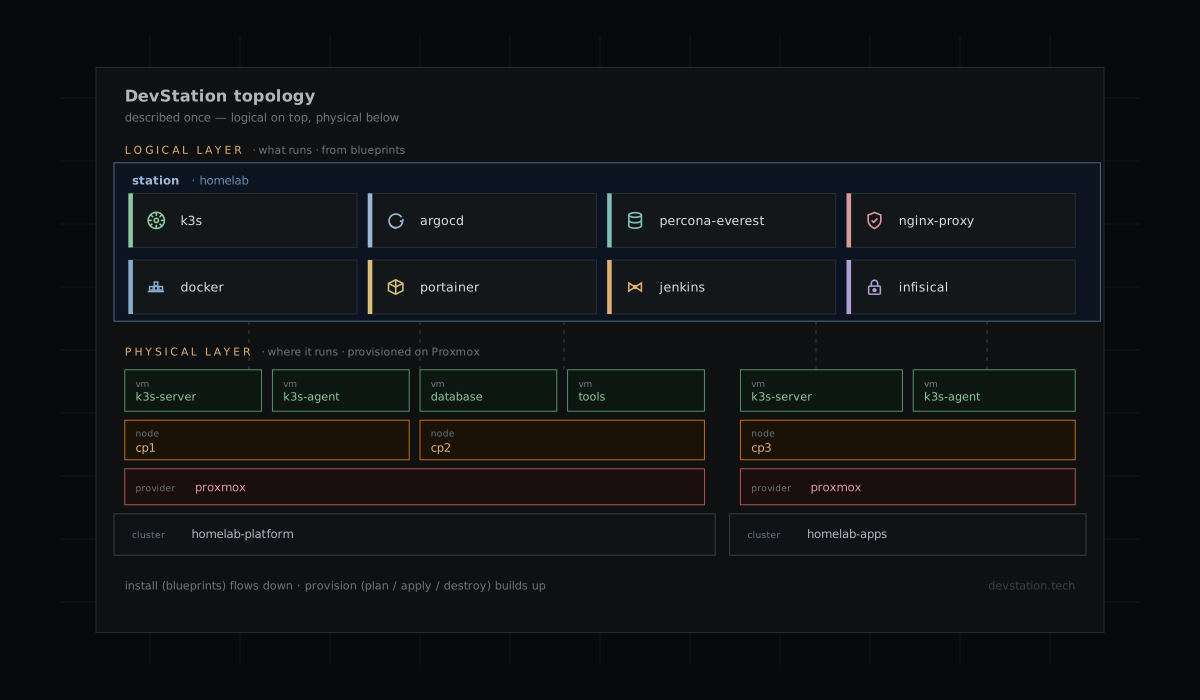
The shape of DevStation follows from that. You describe your topology once (the Proxmox clusters, the nodes, the VMs) and the services that run on top of them, grouped into what we call stations.
A station is a logical cluster: a set of services that can be spread across N VMs and treated as one unit. A station might run k3s (clustered or standalone) as a foundation, and host ArgoCD or Percona Everest on top of it, while another might run an Nginx Proxy Manager that wires up DNS and Let’s Encrypt certificates automatically, or Jenkins sitting on Portainer.
Each service comes from a blueprint: a declarative manifest paired with shell scripts, together describing how to install, verify, and tear a service down. Blueprints are what make a service reproducible, instead of depending on memory. And because the whole topology is declared, DevStation can destroy and reprovision it on demand, from a single VM to the entire estate.
And let an agent drive it
The last piece is that none of this has to be driven by a human at a keyboard. DevStation embeds an MCP server over stdio, so an AI agent (Claude Code, Codex, whatever speaks the Model Context Protocol) can orchestrate every feature: list the topology, provision a node, install a service, tear it all down. The same boundary I use from the terminal is the one an agent uses to run the loop unattended.
Why “DevStation”
The name came before the tool. I’d registered devstation.tech years earlier, at first just to have real DNS in front of the homelab, somewhere to expose services from behind a residential connection. But the word stuck for a reason: what I actually wanted was a development station: a place to prototype personal projects, tinker with home automation, stand up a test bed, throw a proof-of-concept together and tear it down again.
Making that environment reproducible is the first job, but it is not the last. A station is meant to grow into more over time: managing development environments, and, now that agents are part of the workflow, the harness tooling that helps drive projects forward.
There is also a more practical reason. A name that covers all of it (a GitHub org, project-scoped email, a single brand) makes the whole thing feel a little less like a hobby folder and a little more like a project, and keeps it at a healthy arm’s length from my personal profile.
A repeatable rebuild
A disk can fail again. We can reduce that risk with more redundancy and stronger availability guarantees, but the cost rises with them and often stops making sense in a home environment. What has changed is what happens next: instead of hours of manual work and a strained memory, rebuilding the homelab now depends on a described topology and a command. DevStation’s goal is to make that rebuild an ordinary process, not a new project after every failure.